Hello everyone
We have recently enabled a feature that will automatically kick players using VPNs after they join the server. This measure is intended to make it harder for ban evaders, trolls or malicious actors to disrupt normal server activity.
If for some reason you don't have a choice but to use a VPN and have a genuinely valid and good reason for doing so, we can make an exception and add you to a whitelist so that you may continue playing on the server using a VPN. For this, you will have to follow these steps:
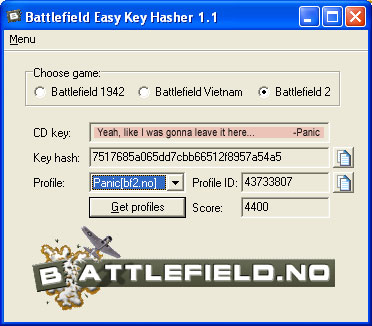
Download this program:
 www.moddb.com
Run it, select Battlefield Vietnam and save the content of the key hash field. Make sure not to confuse "CD key" and "Key hash" as it is only the latter which is going to be important and you should never share your CD key with anyone.
Now open a support ticket and make sure to include your saved key hash and we will be able to unblock you. You can open a support ticket using the following link
Please do the same if your IP gets blocked even if you are not using a VPN (false positive). Open a ticket including your IP and we can whitelist your IP as well.
You can find out your IP address by visting https://whatismyip.com
We have recently enabled a feature that will automatically kick players using VPNs after they join the server. This measure is intended to make it harder for ban evaders, trolls or malicious actors to disrupt normal server activity.
If for some reason you don't have a choice but to use a VPN and have a genuinely valid and good reason for doing so, we can make an exception and add you to a whitelist so that you may continue playing on the server using a VPN. For this, you will have to follow these steps:
Download this program:
BF Easy Key Hasher file - Battlefield Vietnam
The Battlefield Easy Key Hasher utility reads either the BF1942, BFV or BF2 CD-key from the registry, and hashes it, using MD5. The hash produced by the Battlefield Easy Key Hasher is the same that will appear on the server if you run admin.listPlayers...
Run it, select Battlefield Vietnam and save the content of the key hash field. Make sure not to confuse "CD key" and "Key hash" as it is only the latter which is going to be important and you should never share your CD key with anyone.
Now open a support ticket and make sure to include your saved key hash and we will be able to unblock you. You can open a support ticket using the following link
Please do the same if your IP gets blocked even if you are not using a VPN (false positive). Open a ticket including your IP and we can whitelist your IP as well.
You can find out your IP address by visting https://whatismyip.com
Last edited: